
Brivo cloud access, video and identity management
Plan Brivo around door control, identity, mobile credentials, video, visitors and the operational responsibilities of a cloud-managed system.
What Brivo includes—and how to choose
Brivo Access is a cloud-managed access-control platform used to administer sites, doors, users, credentials, schedules and events. The cloud interface does not eliminate field deployment design: every opening still needs compatible locks, request-to-exit, door position, life-safety behavior, enclosure power, battery capacity and a documented controller connection.
Brivo supports mobile credentials and reader options alongside cards and other credential technologies. Credential choice must account for the installed reader population, identity lifecycle, phone eligibility, visitor use and fallback procedure. Mobile access is an operational program, not simply a reader feature.
Brivo Video, Visitor and identity-related capabilities can provide a connected workflow when the selected subscription and hardware support it. The site program record must identify which events are linked, who can search or export evidence, how long video is retained and what happens when WAN or cloud communication is unavailable.
Product families and their roles
This portfolio map separates the main Brivo functions so the site program is not reduced to a generic model list.
Brivo Access
Cloud management for sites, doors, users, schedules, credentials and audit events.
Control panels and readers
Field controllers, reader interfaces, inputs, outputs and supported credential paths.
Mobile Pass and identity
Mobile and physical credential lifecycle aligned with organizational identity rules.
Video and visitor workflows
Cloud video, visitor records and event context where licensed and supported.
Architecture decisions before procurement
The selected family must fit the opening, scene, network, power, software and administrative environment.
Door schedule
Document every lock, sensor, REX, reader, power and emergency behavior per opening.
WAN and resilience
Define controller behavior, event buffering and operator procedure during connectivity loss.
Subscription map
Reconcile sites, doors, users, credentials, video retention and integrations with licensing.
Administrator governance
Apply least privilege, MFA, audit review and named ownership for identity changes.
Operational Acceptance evidence
Acceptance must demonstrate the intended workflow under realistic conditions, not only show that devices appear online.
- Test authorized, denied, forced, held and scheduled door behavior.
- Exercise WAN interruption and verify local decisions, buffered events and recovery.
- Issue and revoke physical and mobile credentials through the approved identity workflow.
- Retrieve a Brivo event with associated video where configured and export approved evidence.
Official Brivo resources
Use the manufacturer pages below for current product status, compatibility, release notes, software and firmware. We link to official resources and do not host firmware files locally.
Detailed deployment planning and product-family guides
Use the detailed Brivo guides below to compare specific hardware, software and deployment decisions.
Brivo Access Cloud Platform Deployment Planning
Explore Brivo Access editions, sites, users, mobile workflows, integrations, cybersecurity and operating responsibilities.
Read the detailed guideBrivo Control Panels, Readers and Door Hardware
Plan ACS300, ACS6000, ACS-SDC or Mercury-based controllers, readers, credentials, power and opening hardware.
Read the detailed guideBuild an on-site installation-ready Brivo scope
Share the site, existing equipment, required workflows and site program timing. We can identify the survey, compatibility checks, deployment design and operational acceptance evidence the site program needs.
Discuss products and on-site installationBrivo planning guidance for Texas facilities
Kingsedco provides Brivo installation, configuration, maintenance and field support. These reference guides help facility, security and IT teams prepare better questions before a survey, upgrade, takeover or troubleshooting engagement.
Discuss Brivo installation or service
Research guides are maintained by 360TechnologyGroup.com, the parent-company knowledge center. Product names belong to their respective owners.
Equipment we supply and install
Brivo is one of the oldest cloud access platforms, which is exactly why so many Texas buildings already have Brivo ACS panels in them — frequently with nobody left who knows the login.
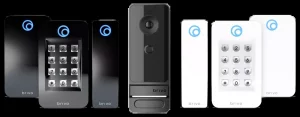

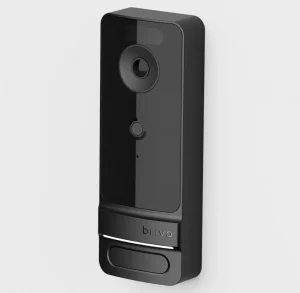

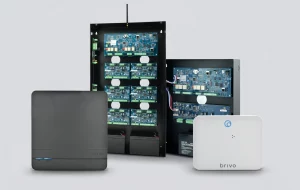
Product images are the manufacturer's, shown for planning. Final models and accessories are confirmed per project.
Brivo access control systems, and what "ACS" refers to
Brivo is a cloud access control platform — one of the oldest, which matters because a lot of buildings already have Brivo panels in them. The management software runs as a service; the control panels and readers stay on site and keep enforcing access if the internet drops.
You will see it written as Brivo ACS (Access Control System), and older estates may know it as Brivo OnAir. If a building changed hands and nobody can say what the door system is, a Brivo panel is one of the more likely answers.
Brivo control panels and readers
- Control panels sit in the comms room and do the actual decision-making — how many doors a panel supports is usually what decides the hardware count on a job.
- Readers and credentials — cards, fobs and mobile. Existing readers can often be reused, which is what makes a takeover far cheaper than a rip-out.
- Door hardware — strikes, maglocks and request-to-exit are the same physical problem as any other system, and are usually where the real cost sits.
- Video integration so a door event has a picture attached to it.
More detail on the platform and hardware on our Brivo cloud platform and control panels and readers pages.
Taking over an existing Brivo system
This is a large share of the Brivo work we do across Houston, Dallas–Fort Worth, Austin and San Antonio. A building is bought or a management company changes, and the new owner has doors that work, no logins, no documentation and no idea who the previous integrator was.
What we establish first: whether the account can be transferred, what firmware the panels are on, which readers and credentials are in use, and which doors are actually wired to which panel — because the drawings, if any exist, are usually wrong. You get that written down whether or not you go on to use us for the work.
See also access control systems generally.
Brivo access control dealers — what the dealer actually does
Brivo is sold and installed through authorized dealers rather than off a shelf, so the dealer is part of what you are buying. That matters more with cloud access control than with most products, because the platform is only as good as the way it was set up.
What we do as a Brivo dealer across Texas:
- Survey and design — which doors, what hardware each opening actually needs, and how many control panels that implies.
- Supply and installation — panels, readers, credentials, strikes and maglocks, request-to-exit, and the cabling behind all of it.
- Configuration — users, groups, schedules and door naming that a technician can follow later.
- Account ownership — the Brivo account is yours, not ours. You should never be unable to administer your own doors because of who installed them.
- Service afterwards — repairs, expansion, and takeover of Brivo systems installed by dealers who have since disappeared.
That last one is a large share of the Brivo work we do. A building changes hands, the new owner has working doors and no logins, and nobody knows which panel serves which opening. We establish that first and write it down.